> ## Documentation Index
> Fetch the complete documentation index at: https://tigerdata-747200db-chore-custom-colored-homepage.mintlify.site/llms.txt
> Use this file to discover all available pages before exploring further.
# Get started with TimescaleDB
> Improve database performance with hypertables, time bucketing, compression and continuous aggregates.
export const TIME_BUCKET_CAP = 'Time bucket';
export const TIME_BUCKET = 'time bucket';
export const TIGER_POSTGRES = 'Tiger Postgres';
export const SCALE = 'Scale';
export const PRICING_PLAN = 'pricing plan';
export const HA_REPLICA = 'high-availability replica';
export const ENTERPRISE = 'Enterprise';
export const CONSOLE = 'Tiger Cloud Console';
export const COMPANY = 'TigerData';
export const CLOUD_LONG = 'Tiger Cloud';
export const CAGG = 'continuous aggregate';
export const COLUMNSTORE = 'columnstore';
export const ROWSTORE = 'rowstore';
export const HYPERTABLE = 'hypertable';
export const HYPERCORE_CAP = 'Hypercore';
export const HYPERTABLEs_0 = undefined
export const HYPERCORE = 'hypercore';
export const PG = 'Postgres';
export const TIMESCALE_DB = 'TimescaleDB';
export const SELF_LONG = 'self-hostedTimescaleDB';
export const SERVICE_LONG = 'Tiger Cloud service';
export const SERVICE_SHORT = 'service';
export const CONSOLE_LONG = 'Tiger Cloud Console';
{TIMESCALE_DB} is a {PG}-based database that is optimized for time-series data. It
provides a range of features and optimizations that supercharge your queries while keeping the
costs down. For example:
* The {HYPERCORE} row-columnar engine in {TIMESCALE_DB} makes queries up to 350x faster, ingests 44% faster, and reduces
storage by 90%.
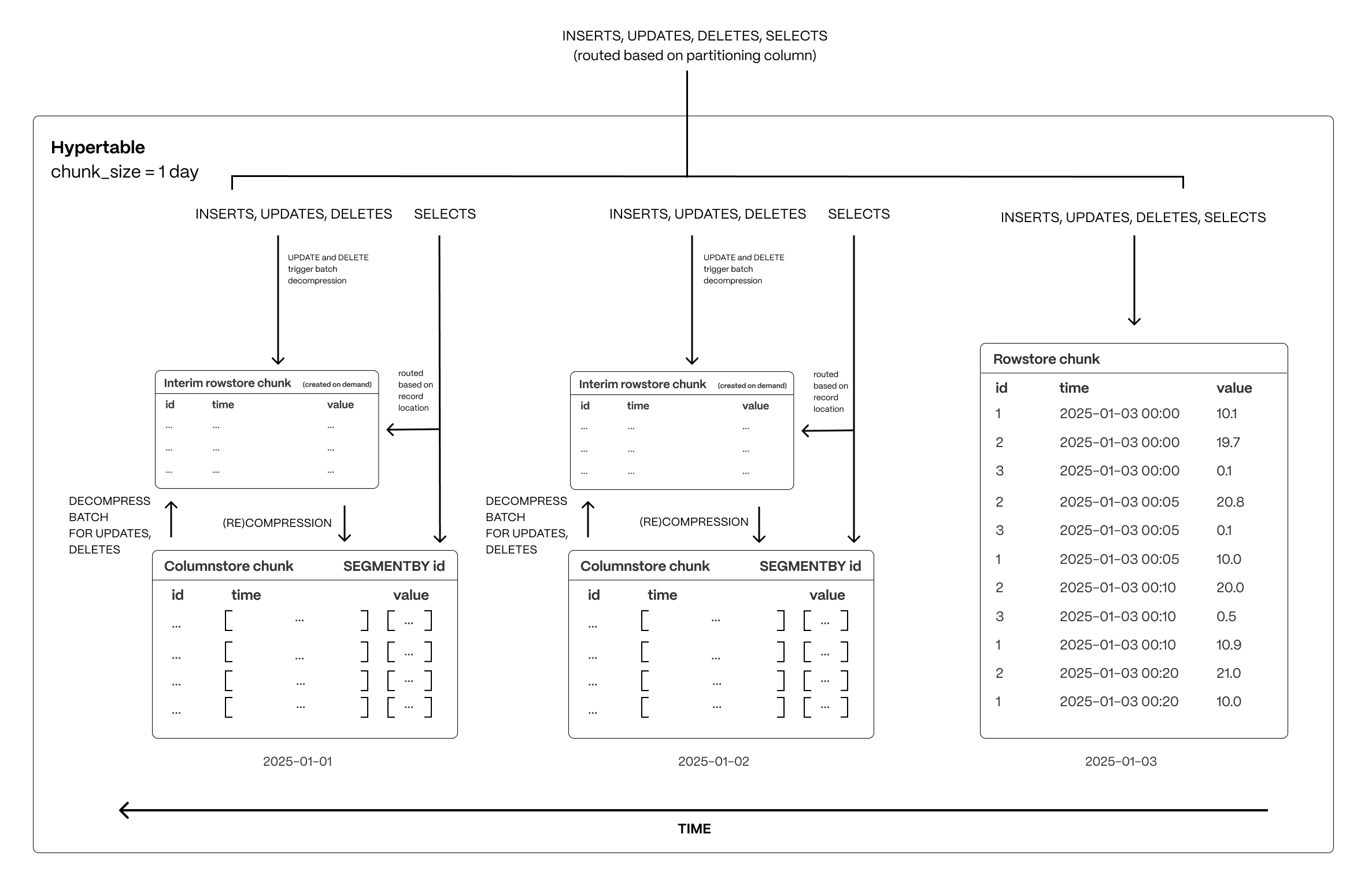
The following figure shows how {TIMESCALE_DB} optimizes your data for superfast real-time analytics:
This page shows you how to rapidly implement the features in {CLOUD_LONG} that enable you to
ingest and query data faster while keeping the costs low.
## Prerequisites
To follow the steps on this page:
* Create a target [{SERVICE_LONG}][create-service] with time-series and analytics enabled.
You need [your connection details][connection-info]. This procedure also
works for [{SELF_LONG}][enable-timescaledb].
[create-service]: /cloud/tiger/get-started/create-services
[enable-timescaledb]: /open-source/timescaledb/install-and-update/install-self-hosted
[connection-info]: /integrations/find-connection-details
## Optimize time-series data in {HYPERTABLE}s with {HYPERCORE}
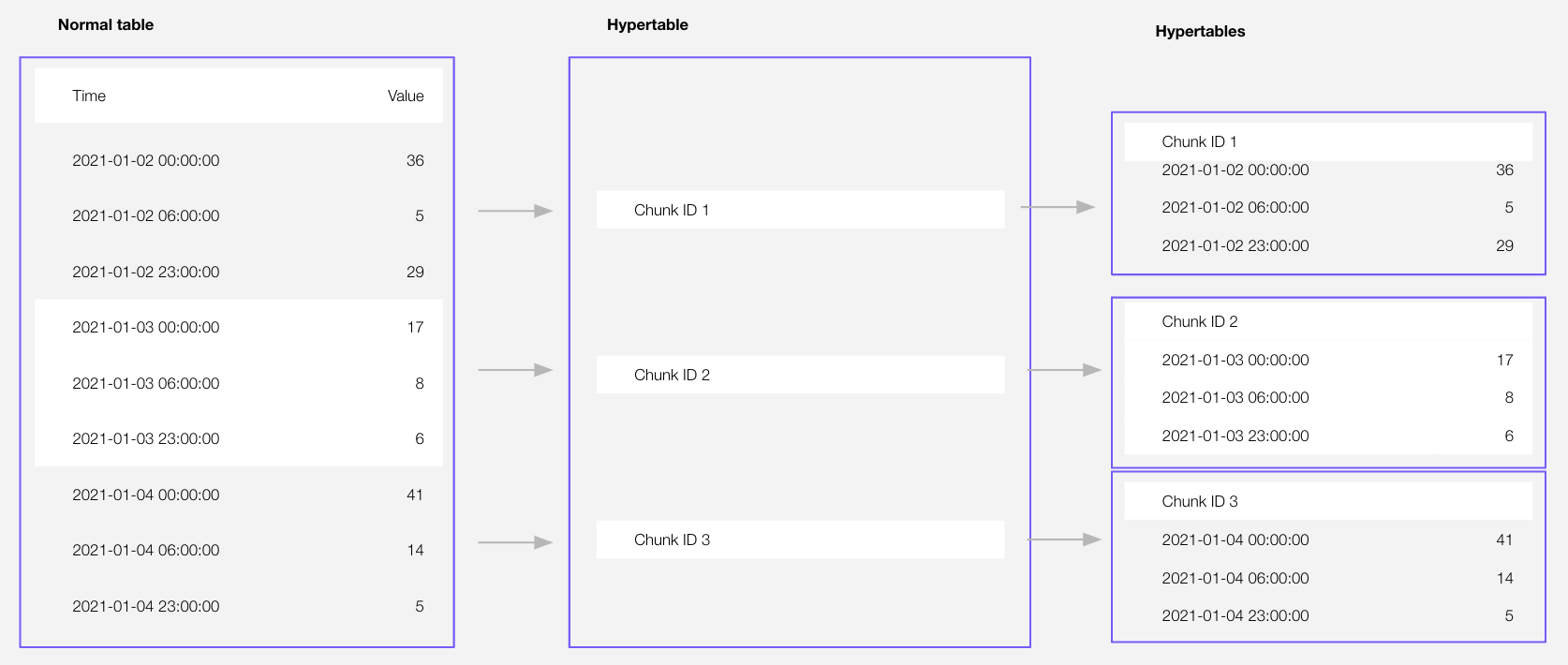
Time-series data represents the way a system, process, or behavior changes over time. {HYPERTABLE}\_CAPs are {PG} tables
that help you improve insert and query performance by automatically partitioning your data by time. Each {HYPERTABLE}
is made up of child tables called {CHUNK}s. Each {CHUNK} is assigned a range of time, and only
contains data from that range. When you run a query, {TIMESCALE_DB} identifies the correct {CHUNK} and runs the query on
it, instead of going through the entire table. You can also tune {HYPERTABLE}s to increase performance even more.
[{HYPERCORE_CAP}][hypercore] is the hybrid row-columnar storage engine in {TIMESCALE_DB} used by {HYPERTABLEs_0}. Traditional
databases force a trade-off between fast inserts (row-based storage) and efficient analytics
(columnar storage). {HYPERCORE_CAP} eliminates this trade-off, allowing real-time analytics without sacrificing
transactional capabilities.
{HYPERCORE_CAP} dynamically stores data in the most efficient format for its lifecycle:
* **Row-based storage for recent data**: the most recent chunk (and possibly more) is always stored in the {ROWSTORE},
ensuring fast inserts, updates, and low-latency single record queries. Additionally, row-based storage is used as a
writethrough for inserts and updates to columnar storage.
* **Columnar storage for analytical performance**: chunks are automatically compressed into the {COLUMNSTORE}, optimizing
storage efficiency and accelerating analytical queries.
Unlike traditional columnar databases, {HYPERCORE} allows data to be inserted or modified at any stage, making it a
flexible solution for both high-ingest transactional workloads and real-time analytics—within a single database.
[hypercore]: /use-timescale/hypercore/
{HYPERTABLE}\_CAPs exist alongside regular {PG} tables.
You use regular {PG} tables for relational data, and interact with {HYPERTABLE}s
and regular {PG} tables in the same way.
This section shows you how to create regular tables and {HYPERTABLE}s, and import
relational and time-series data from external files.
1. **Import some time-series data into {HYPERTABLE}s**
1. Unzip [crypto\_sample.zip](https://assets.timescale.com/docs/downloads/candlestick/crypto_sample.zip) to a ``.
This test dataset contains:
* Second-by-second data for the most-traded crypto-assets. This time-series data is best suited for
optimization in a [hypertable][hypertables-section].
* A list of asset symbols and company names. This is best suited for a regular relational table.
To import up to 100GB of data directly from your current {PG}-based database,
[migrate with downtime][migrate-with-downtime] using native {PG} tooling. To seamlessly import 100GB-10TB+
of data, use the [live migration][migrate-live] tooling supplied by {COMPANY}. To add data from non-{PG} data
sources, see [Import and ingest data][data-ingest].
2. Upload data into a {HYPERTABLE}:
To more fully understand how to create a {HYPERTABLE}, how {HYPERTABLE}s work, and how to optimize them for
performance by tuning {CHUNK} intervals and enabling chunk skipping, see
[the {HYPERTABLE}s documentation][hypertables-section].
1. In Terminal, navigate to `` and connect to your {SERVICE_SHORT}.
```bash
psql -d "postgres://:@:/"
```
You use your [connection details][connection-info] to fill in this {PG} connection string.
2. Create tables for the data to import:
* For the time-series data:
1. In your sql client, create a {HYPERTABLE}:
Create a [{HYPERTABLE}][hypertables-section] for your time-series data using [CREATE TABLE][hypertable-create-table].
For [efficient queries][secondary-indexes], remember to `segmentby` the column you will
use most often to filter your data. For example:
```sql
CREATE TABLE crypto_ticks (
"time" TIMESTAMPTZ,
symbol TEXT,
price DOUBLE PRECISION,
day_volume NUMERIC
) WITH (
tsdb.hypertable,
tsdb.partition_column='time',
tsdb.segmentby = 'symbol'
);
```
If you are self-hosting {TIMESCALE_DB} v2.19.3 and below, create a [{PG} relational table][pg-create-table],
then convert it using [create\_hypertable][create_hypertable]. You then enable {HYPERCORE} with a call
to [ALTER TABLE][alter_table_hypercore].
[pg-create-table]: https://www.postgresql.org/docs/current/sql-createtable.html
[create_hypertable]: /api/hypertable/create_hypertable/
[alter_table_hypercore]: /api/hypercore/alter_table/
* For the relational data:
In your sql client, create a normal {PG} table:
```sql
CREATE TABLE crypto_assets (
symbol TEXT NOT NULL,
name TEXT NOT NULL
);
```
3. Upload the dataset to your {SERVICE_SHORT}:
```sql
\COPY crypto_ticks from './tutorial_sample_tick.csv' DELIMITER ',' CSV HEADER;
```
```sql
\COPY crypto_assets from './tutorial_sample_assets.csv' DELIMITER ',' CSV HEADER;
```
2. **Have a quick look at your data**
You query {HYPERTABLE}s in exactly the same way as you would a relational {PG} table.
Use one of the following SQL editors to run a query and see the data you uploaded:
* **psql**: easily run queries on your {SERVICE_LONG}s or self-hosted {TIMESCALE_DB} deployment from Terminal.
## Enhance query performance for analytics
{HYPERCORE}\_CAP is the {TIMESCALE_DB} hybrid row-columnar storage engine, designed specifically for real-time
analytics and
powered by time-series data. The advantage of {HYPERCORE} is its ability to seamlessly switch between row-oriented and
column-oriented storage. This flexibility enables {TIMESCALE_DB} to deliver the best of both worlds, solving the key
challenges in real-time analytics.
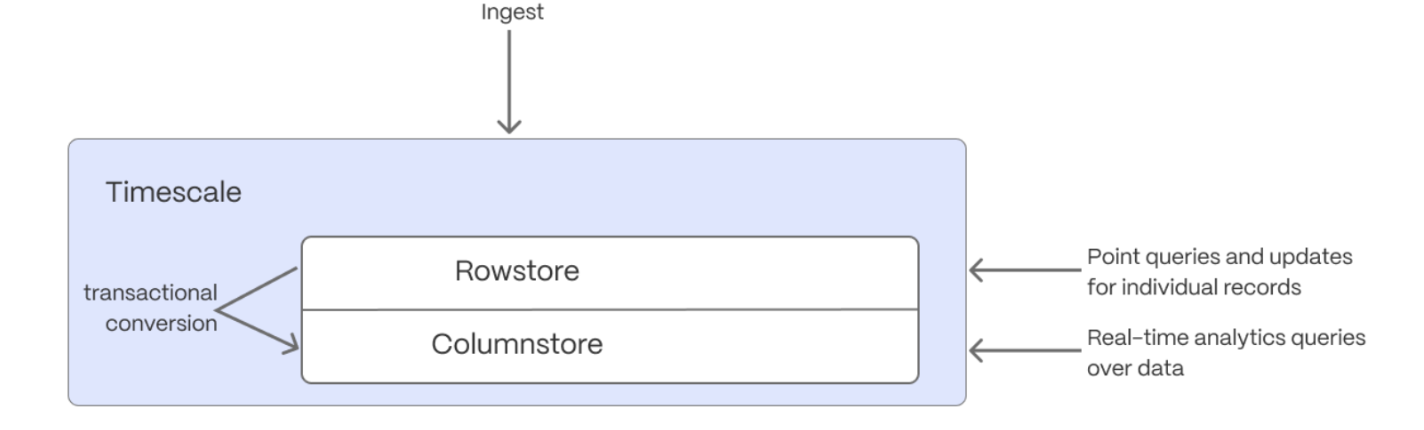
When {TIMESCALE_DB} converts {CHUNK}s from the {ROWSTORE} to the {COLUMNSTORE}, multiple records are grouped into a single row.
The columns of this row hold an array-like structure that stores all the data. Because a single row takes up less disk
space, you can reduce your {CHUNK} size by more than 90%, and can also speed up your queries. This helps you save on storage costs,
and keeps your queries operating at lightning speed.
{HYPERCORE} is enabled by default when you call [CREATE TABLE][hypertable-create-table]. Best practice is to compress
data that is no longer needed for highest performance queries, but is still accessed regularly in the {COLUMNSTORE}.
For example, yesterday's market data.
1. **Add a policy to convert {CHUNK}s to the {COLUMNSTORE} at a specific time interval**
For example, yesterday's data:
```sql
CALL add_columnstore_policy('crypto_ticks', after => INTERVAL '1d');
```
If you have not configured a `segmentby` column, {TIMESCALE_DB} chooses one for you based on the data in your
{HYPERTABLE}. For more information on how to tune your {HYPERTABLE}s for the best performance, see
[efficient queries][secondary-indexes].
2. **View your data space saving**
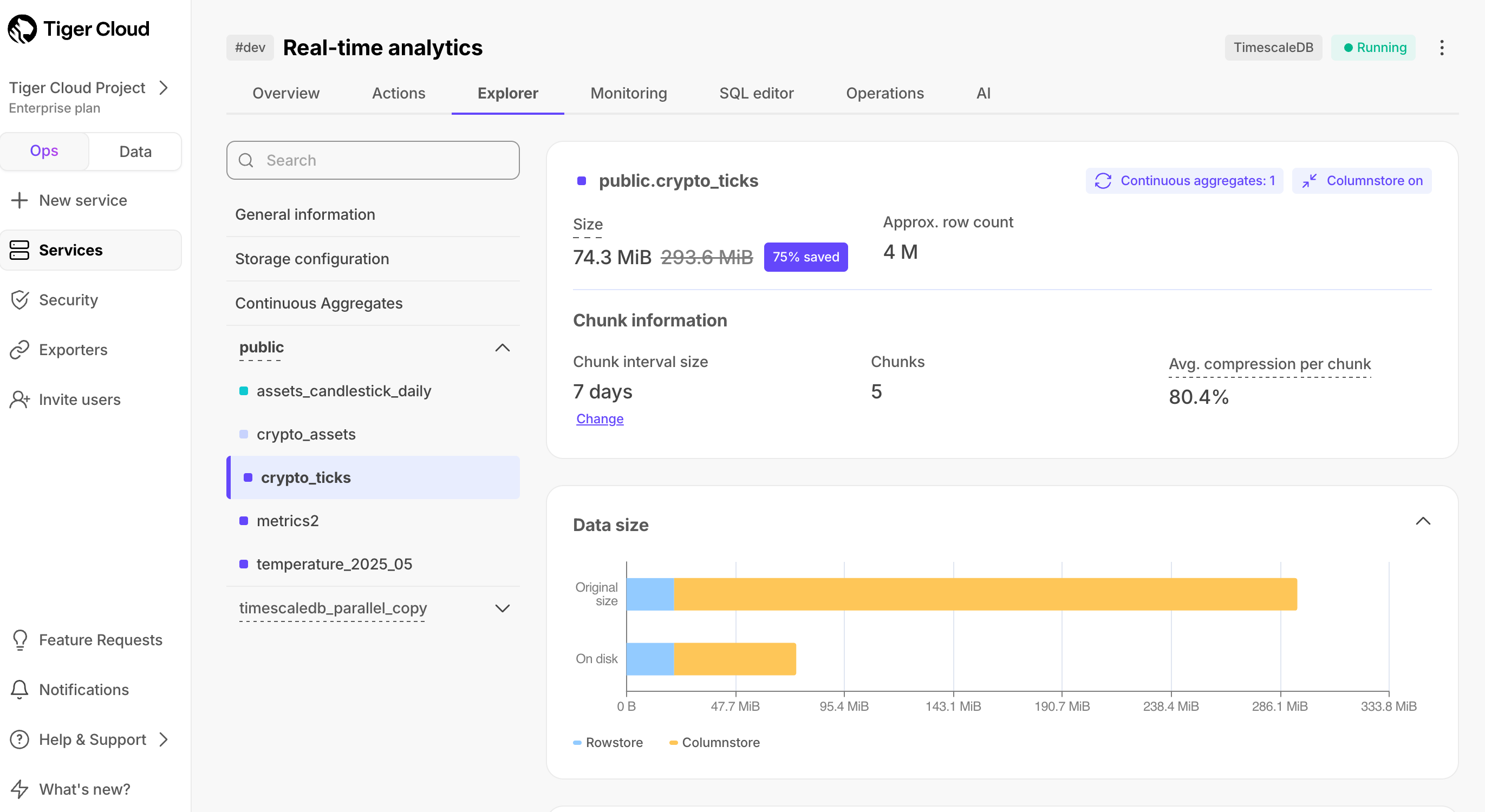
When you convert data to the {COLUMNSTORE}, as well as being optimized for analytics, it is compressed by more than
90%. This helps you save on storage costs and keeps your queries operating at lightning speed. To see the amount of space
saved, click `Explorer` > `public` > `crypto_ticks`.
## Write fast and efficient analytical queries
Aggregation is a way of combing data to get insights from it. Average, sum, and count are all
examples of simple aggregates. However, with large amounts of data, aggregation slows things down, quickly.
{CAGG}\_CAPs are a kind of {HYPERTABLE} that is refreshed automatically in
the background as new data is added, or old data is modified. Changes to your dataset are tracked,
and the {HYPERTABLE} behind the {CAGG} is automatically updated in the background.
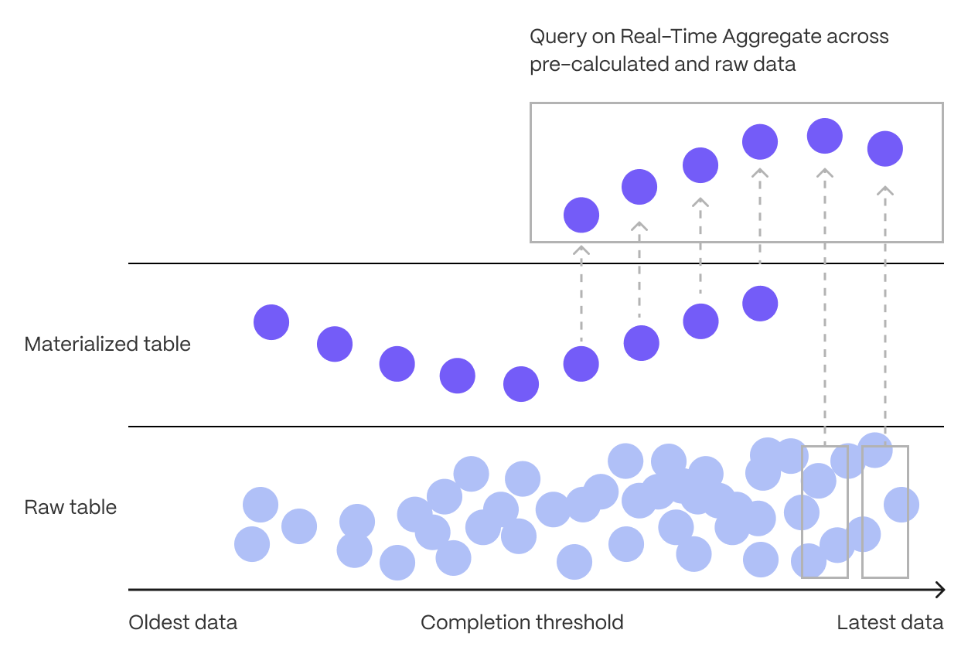
You create {CAGG}s on uncompressed data in high-performance storage. They continue to work
on [data in the {COLUMNSTORE}][test-drive-enable-compression]
and [rarely accessed data in tiered storage][test-drive-tiered-storage]. You can even
create [{CAGG}s on top of your {CAGG}s][hierarchical-caggs].
You use {TIME_BUCKET}s to create a {CAGG}. {TIME_BUCKET_CAP}s aggregate data in {HYPERTABLE}s by time
interval. For example, a 5-minute, 1-hour, or 3-day bucket. The data grouped in a {TIME_BUCKET} uses a single
timestamp. {CAGG}\_CAPs minimize the number of records that you need to look up to perform your
query.
This section shows you how to run fast analytical queries using {TIME_BUCKET}s and {CAGG} in
{CONSOLE}. You can also do this using psql.
1. **Connect to your {SERVICE_SHORT}**
In [{CONSOLE}][portal-data-mode], select your {SERVICE_SHORT} in the connection drop-down in the top right.
2. **Create a {CAGG}**
For a {CAGG}, data grouped using a {TIME_BUCKET} is stored in a
{PG} `MATERIALIZED VIEW` in a {HYPERTABLE}. `timescaledb.continuous` ensures that this data
is always up to date.
In data mode, use the following code to create a {CAGG} on the real-time data in
the `crypto_ticks` table:
```sql
CREATE MATERIALIZED VIEW assets_candlestick_daily
WITH (timescaledb.continuous) AS
SELECT
time_bucket('1 day', "time") AS day,
symbol,
max(price) AS high,
first(price, time) AS open,
last(price, time) AS close,
min(price) AS low
FROM crypto_ticks srt
GROUP BY day, symbol;
```
This {CAGG} creates the [candlestick chart][charts] data you use to visualize
the price change of an asset.
3. **Create a policy to refresh the view every hour**
```sql
SELECT add_continuous_aggregate_policy('assets_candlestick_daily',
start_offset => INTERVAL '3 weeks',
end_offset => INTERVAL '24 hours',
schedule_interval => INTERVAL '3 hours');
```
4. **Have a quick look at your data**
You query {CAGG}s exactly the same way as your other tables. To query the `assets_candlestick_daily`
{CAGG} for all assets:
To see the change in terms of query time and data returned between a regular query and
a {CAGG}, run the query part of the {CAGG}
( `SELECT ...GROUP BY day, symbol;` ) and compare the results.
[tutorials]: /tutorials/
[connect-with-code]: /getting-started/start-coding-with-timescale/
[integrations]: /integrations/
[use-the-api]: /api/
[use-timescale]: /use-timescale/
[connection-info]: /integrations/find-connection-details/
[create-a-service]: /getting-started/services/
[deploy-self-hosted]: /self-hosted//install/
[connect-to-your-service]: /getting-started/run-queries-from-console/
[portal-ops-mode]: https://console.cloud.timescale.com/dashboard/services
[portal-data-mode]: https://console.cloud.timescale.com/dashboard/services?popsql
[migrate-with-downtime]: /migrate/pg-dump-and-restore/
[migrate-live]: /migrate/live-migration/
[data-ingest]: /use-timescale/ingest-data/
[hypertables-section]: /use-timescale/hypertables/
[test-drive-enable-compression]: /getting-started/try-key-features-timescale-products/#enhance-query-performance-for-analytics
[test-drive-tiered-storage]: /getting-started/try-key-features-timescale-products/#slash-storage-charges
[data-tiering]: /use-timescale/data-tiering/
[compression]: /use-timescale/compression/
[hierarchical-caggs]: /use-timescale/continuous-aggregates/hierarchical-continuous-aggregates/
[charts]: https://www.investopedia.com/terms/c/candlestick.asp
[hierarchical-storage]: https://en.wikipedia.org/wiki/Hierarchical_storage_management
[querying-tiered-data]: /use-timescale/data-tiering/querying-tiered-data/
[data-tiering]: /use-timescale/data-tiering/
[pricing-plans]: /about/pricing-and-account-management
[querying-tiered-data]: /use-timescale/data-tiering/querying-tiered-data/
[high-availability]: /use-timescale/ha-replicas/high-availability/
[sign-up]: https://console.cloud.timescale.com/signup
[job]: /api/actions/add_job/
[alter-table-arguments]: /api/hypercore/alter_table/#arguments
[add_columnstore_policy]: /api/hypercore/add_columnstore_policy/
[hypertables-section]: /use-timescale/hypertables/
[hypertable-create-table]: /api/hypertable/create_table/
[hypercore]: /use-timescale/hypercore/
[secondary-indexes]: /use-timescale/hypercore/secondary-indexes/