> ## Documentation Index
> Fetch the complete documentation index at: https://tigerdata-747200db-chore-custom-colored-homepage.mintlify.site/llms.txt
> Use this file to discover all available pages before exploring further.
# Changelog
> A weekly summary of the latest changes to TigerData products with links to detailed documentation
export const SERVICE_LONG = 'Tiger Cloud service';
### Run multiple statements in SQL editor
Execute complex queries with multiple commands in a single run—perfect for data transformations, table setup, and batch operations.
### Branch conversations in SQL assistant
Start new discussion threads from any point in your SQL assistant chat to explore different approaches to your data questions more easily.
### Smarter results table
* Expand JSON data instantly: turn complex JSON objects into readable columns with one click—no more digging through nested data structures.
* Filter with precision: use a new smart filter to pick exactly what you want from a dropdown of all available values.
### Jobs page improvements
Individual job pages now display their corresponding configuration for TimescaleDB job types—for example, columnstore, retention, CAgg refreshes, tiering, and others.
### Multiple AWS Transit Gateways
You can now connect multiple AWS Transit Gateways, when those gateways use overlapping CIDRs. Ideal for teams with zero-trust policies, this lets you keep each network path isolated.
How it works: when you create a new peering connection, Tiger Cloud reuses the existing Transit Gateway if you supply the same ID—otherwise it automatically creates a new, isolated Transit Gateway.
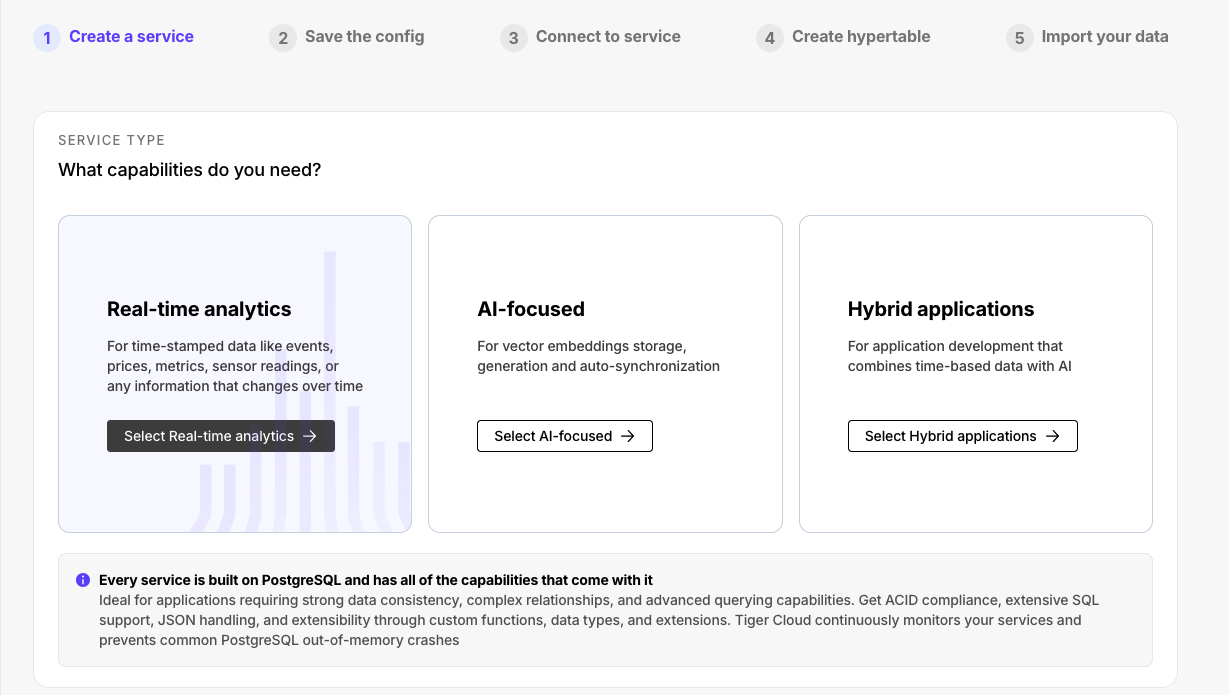
### Updated service creation flow
The new service creation flow makes the choice of service type clearer. You can now create distinct types with Postgres extensions for real-time analytics (TimescaleDB), AI (pgvectorscale, pgai), and RTA/AI hybrid applications.
The latest version of the Timescale Terraform provider (2.3.0) adds support for:
* Creating and attaching observability exporters to your services.
* Securing the connections to your Timescale Cloud services with AWS Transit Gateway.
* Configuring CIDRs for VPC and AWS Transit Gateway connections.
Check the [Timescale Terraform provider documentation](https://registry.terraform.io/providers/timescale/timescale/latest/docs) for more details.
### TimescaleDB v2.20.3
This patch release for TimescaleDB v2.20 includes several bug fixes and minor improvements.
Notable bug fixes include:
* Adjustments to SkipScan costing for queries that require a full scan of indexed data.
* A fix for issues encountered during dump and restore operations when chunk skipping is enabled.
* Resolution of a bug related to dropped "quals" (qualifications/conditions) in SkipScan.
For a comprehensive list of changes, refer to the [TimescaleDB 2.20.3 release notes](https://github.com/timescale/timescaledb/releases/tag/2.20.3).
## 🧘 Read replica sets, faster tables, new anthropic models, and VPC support in data mode
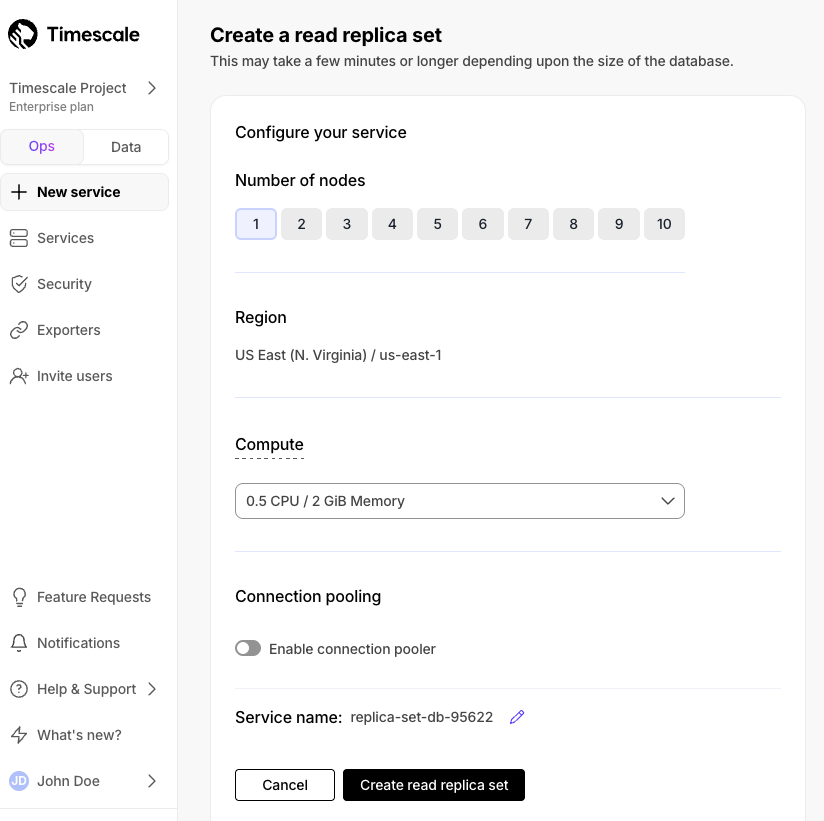
### Horizontal read scaling with read replica sets
[Read replica sets](https://docs.timescale.com/use-timescale/latest/ha-replicas/read-scaling/) are an improved version of read replicas. They let you scale reads horizontally by creating up to 10 replica nodes behind a single read endpoint. Just point your read queries to the endpoint and configure the number of replicas you need without changing your application logic. You can increase or decrease the number of replicas in the set dynamically, with no impact on the endpoint.
Read replica sets are used to:
* Scale reads for read-heavy workloads and dashboards.
* Isolate internal analytics and reporting from customer-facing applications.
* Provide high availability and fault tolerance for read traffic.
All existing read replicas have been automatically upgraded to a replica set with one node—no action required. Billing remains the same.
Read replica sets are available for all Scale and Enterprise customers.
### Faster, smarter results tables in data mode
We've completely rebuilt how query results are displayed in the data mode to give you a faster, more powerful way to work with your data. The new results table can handle millions of rows with smooth scrolling and instant responses when you sort, filter, or format your data. You'll find it today in notebooks and presentation pages, with more areas coming soon.
What's new:
* **Your settings stick around**: when you customize how your table looks—applying filters, sorting columns, or formatting data—those settings are automatically saved. Switch to another tab and come back, and everything stays exactly how you left it.
* **Better ways to find what you need**: filter your results by any column value, with search terms highlighted so you can quickly spot what you're looking for. The search box is now available everywhere you work with data.
* **Export exactly what you want**: download your entire table or just select the specific rows and columns you need. Both CSV and Excel formats are supported.
* **See patterns in your data**: highlight cells based on their values to quickly spot trends, outliers, or important thresholds in your results.
* **Smoother navigation**: click any row number to see the full details in an expanded view. Columns automatically resize to show your data clearly, and web links in your results are now clickable.
As a result, working with large datasets is now faster and more intuitive. Whether you're exploring millions of rows or sharing results with your team, the new table keeps up with how you actually work with data.
### Latest anthropic models added to SQL assistant
Data mode's [SQL assistant](https://docs.timescale.com/getting-started/latest/run-queries-from-console/#sql-assistant) now supports Anthropic's latest models:
* Sonnet 4
* Sonnet 4 (extended thinking)
* Opus 4
* Opus 4 (extended thinking)
### VPC support for passwordless data mode connections
We previously made it much easier to connect newly created services to Timescale’s [data mode](https://docs.timescale.com/getting-started/latest/run-queries-from-console/#data-mode). We have now expanded this functionality to services using a VPC.
To learn more, see the [postgresql-unit documentation](https://github.com/df7cb/postgresql-unit).
[release-notes]: /about/:currentVersion:/release-notes/
[timescaledb-releases]: https://github.com/timescale/timescaledb/releases/
[pgai]: https://github.com/timescale/pgai
[pgvectorscale]: https://github.com/timescale/pgvectorscale/
[signup]: https://console.cloud.timescale.com/signup
[sql-editor]: /getting-started/:currentVersion:/run-queries-from-console/#sql-editor
[aws-timescale]: https://aws.amazon.com/marketplace/seller-profile?id=seller-wbtecrjp3kxpm
[ops-mode-allow-list]: /about/:currentVersion:/changelog/#-ip-allow-lists
[popsql-web]: https://app.popsql.com/login
[popsql-desktop]: https://popsql.com/download
[console]: https://console.cloud.timescale.com/dashboard/services
[integrations]: /integrations/:currentVersion:/
[log-28032025-pgvectorscale-rn]: https://github.com/timescale/pgvectorscale/releases/tag/0.7.0
[log-28032025-pgvectorscale-example]: https://github.com/timescale/pgvectorscale?tab=readme-ov-file#label-based-filtering-with-diskann