> ## Documentation Index
> Fetch the complete documentation index at: https://tigerdata-747200db-chore-custom-colored-homepage.mintlify.site/llms.txt
> Use this file to discover all available pages before exploring further.
# Run your queries from Console
> Choose the right tool to manage your data. Tiger Cloud offers the data mode, the SQL editor, and the SQL Assistant to better address your needs
export const SERVICE_LONG = 'Tiger Cloud service';
export const COMPANY = 'TigerData';
As {CLOUD_LONG} is based on {PG}, you can use lots of [different tools][integrations] to
connect to your {SERVICE_SHORT} and interact with your data.
In {CONSOLE} you can use the following ways to run SQL queries against your {SERVICE_SHORT}:
* [{DATA_MODE_CAP}][run-popsql]: a rich experience powered by {POPSQL}. You can write queries with
autocomplete, save them in folders, share them, create charts/dashboards, and much more.
* [{SQL_ASSISTANT_SHORT} in the {DATA_MODE}][sql-assistant]: write, fix, and organize SQL faster and more accurately.
* [{SQL_EDITOR} in the {OPS_MODE}][run-sqleditor]: a simple {SQL_EDITOR} in the {OPS_MODE} that lets you run ad-hoc ephemeral
queries. This is useful for quick one-off tasks like creating an index on a small table or inspecting `pg_stat_statements`.
If you prefer the command line to the {OPS_MODE} {SQL_EDITOR} in {CONSOLE}, use [psql][install-psql].
## Data mode
You use the {DATA_MODE} in {CONSOLE} to write queries, visualize data, and share your results.
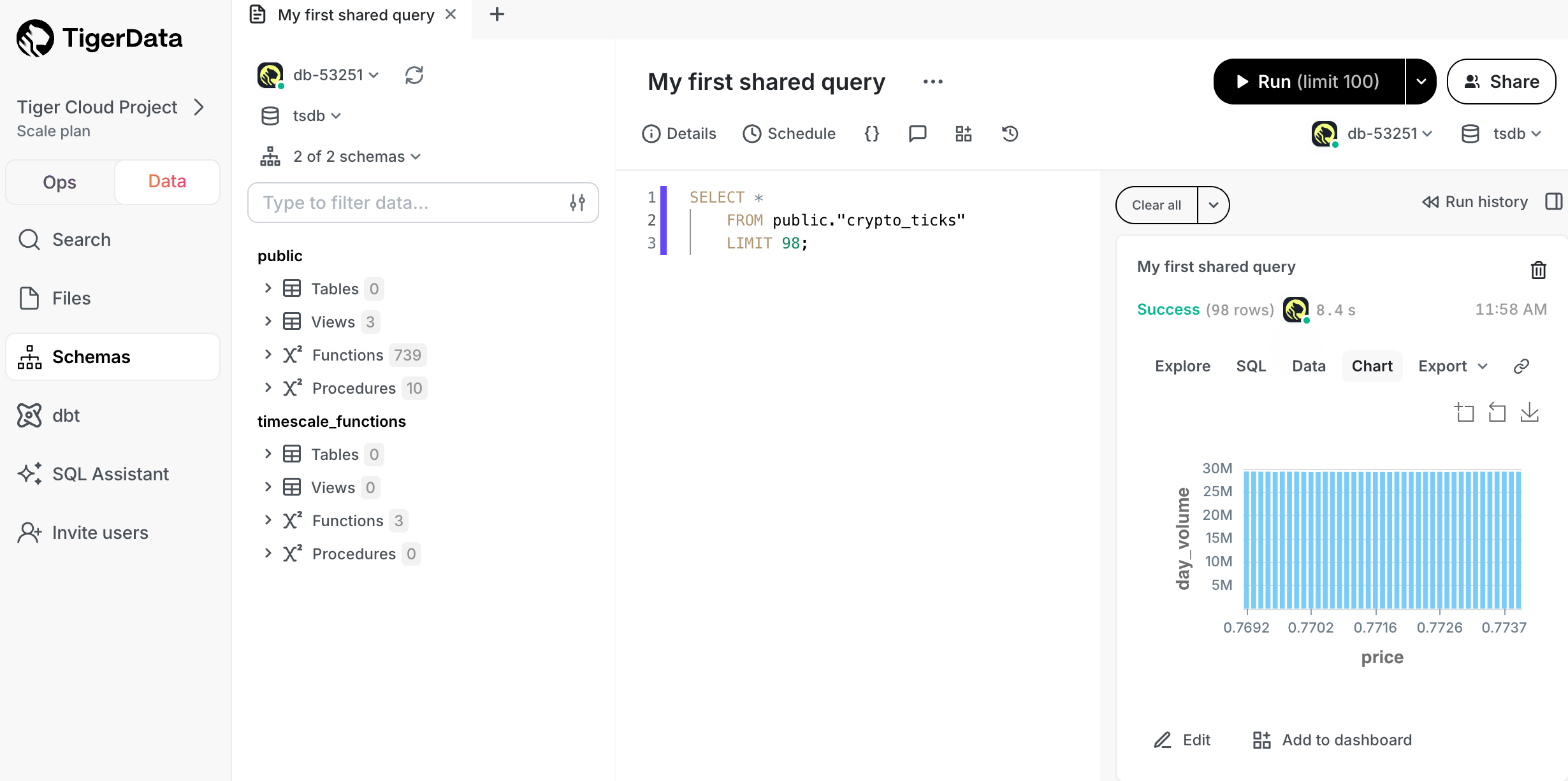
Available features are:
* **Real-time collaboration**: work with your team directly in the {DATA_MODE} query editor with live presence and multiple
cursors.
* **[Schema browser][schema-browser]**: understand the structure of your {SERVICE_SHORT} and see usage data on tables and columns.
* **[{SQL_ASSISTANT_SHORT}][sql-assistant]**: write, fix, and organize SQL faster and more accurately using AI.
* **Autocomplete**: get suggestions as you type your queries.
* **[Version history][version-history]**: access previous versions of a query from the built-in revision history, or connect to a git repo.
* **[Charts][charts]**: visualize data from inside the UI rather than switch to Sheets or Excel.
* **[Schedules][schedules]**: automatically refresh queries and dashboards to create push alerts.
* **[Query variables][query-variables]**: use Liquid to parameterize your queries or use `if` statements.
* **Cross-platform support**: work from [{CONSOLE}][portal-data-mode] or download the [desktop app][popsql-desktop] for macOS, Windows, and Linux.
* **Easy connection**: connect to {CLOUD_LONG}, {PG}, Redshift, Snowflake, BigQuery, MySQL, SQL Server, [and more][popsql-connections].
### Connect to your {SERVICE_LONG} in the data mode
To connect to a {SERVICE_SHORT}:
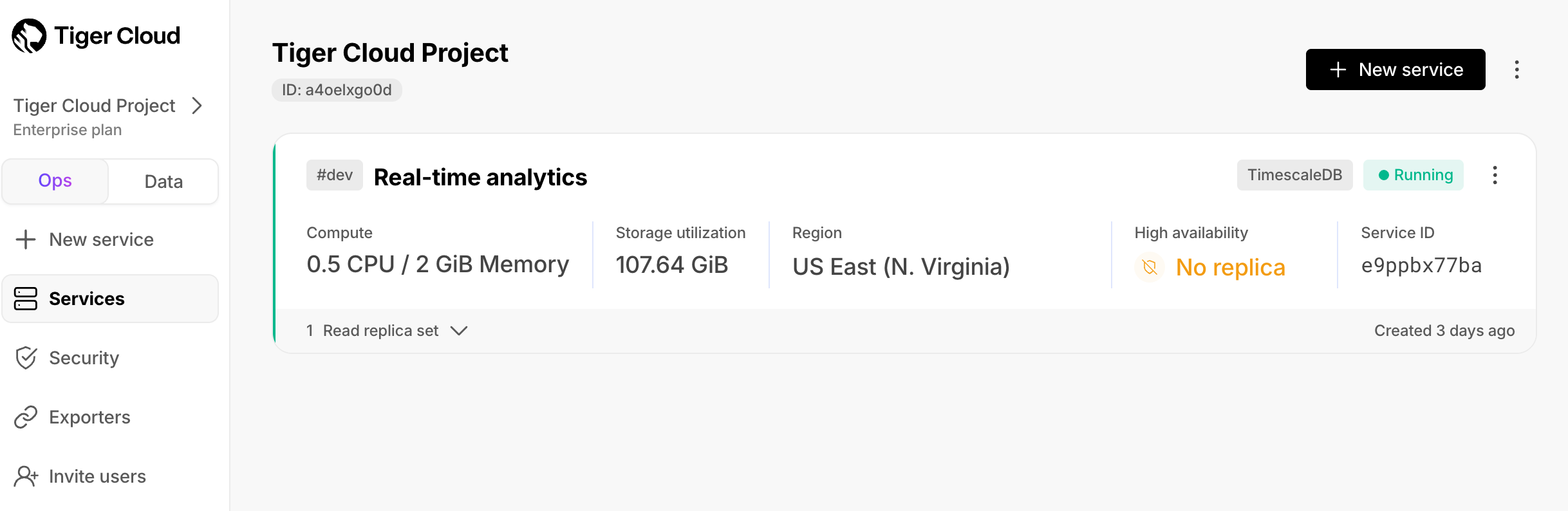
1. **Check your {SERVICE_SHORT} is running correctly**
In [{CONSOLE}][services-portal], check that your {SERVICE_SHORT} is marked as `Running`:
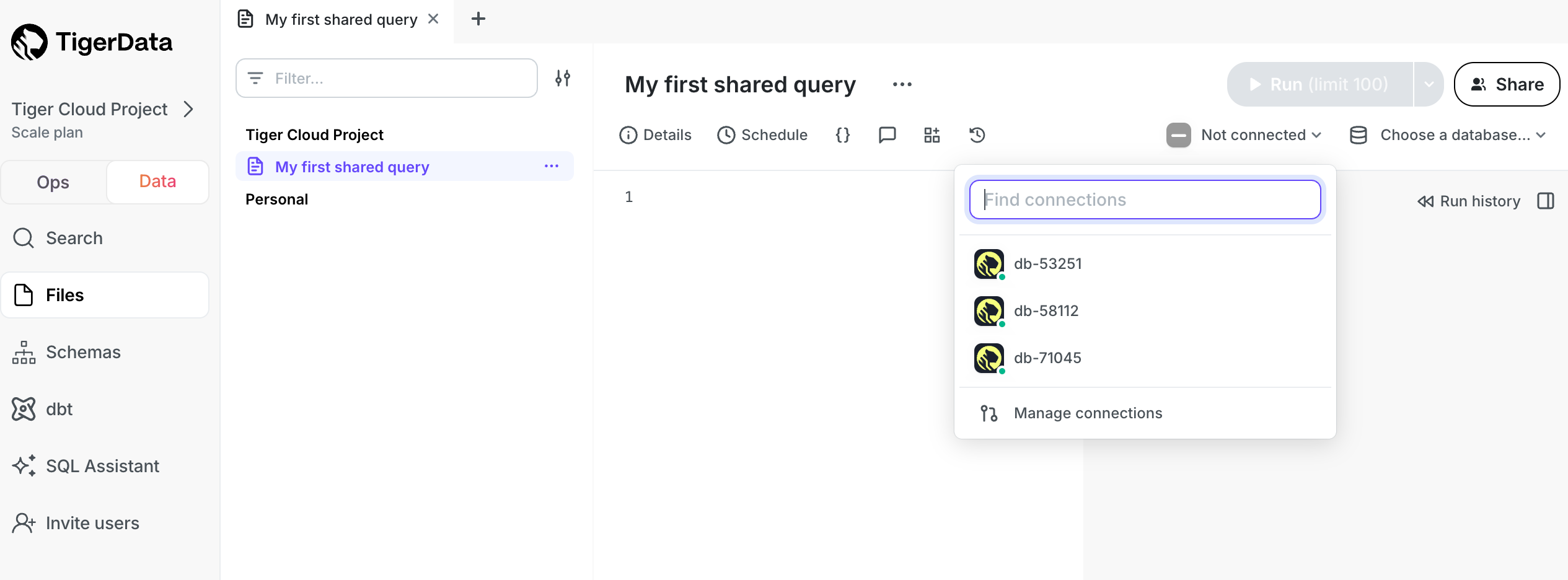
2. **Connect to your {SERVICE_SHORT}**
In the [{DATA_MODE}][portal-data-mode] in {CONSOLE}, select a {SERVICE_SHORT} in the connection drop-down:
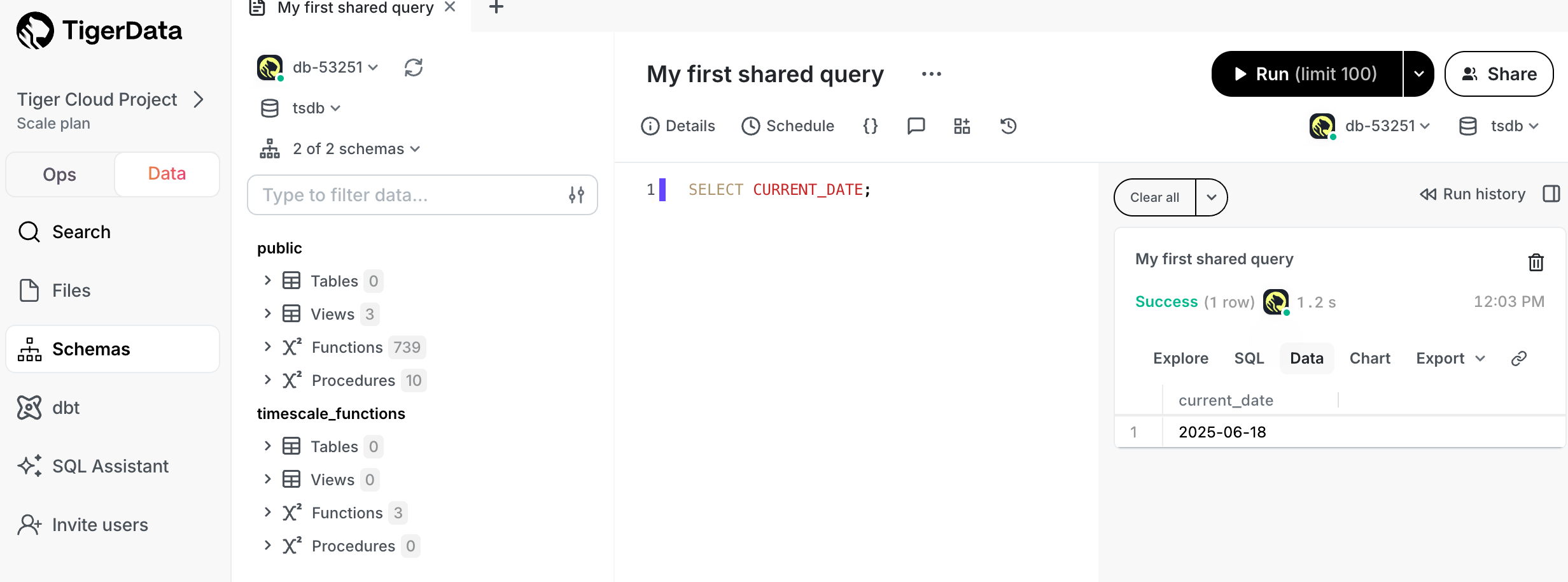
3. **Run a test query**
Type `SELECT CURRENT_DATE;` in `Scratchpad` and click `Run`:
Quick recap. You:
* Manage your {SERVICE_SHORT}s in the [{OPS_MODE} in {CONSOLE}][portal-ops-mode]
* Manage your data in the [{DATA_MODE} in {CONSOLE}][portal-data-mode]
* Store configuration and security information in your config file.
Now you have used the {DATA_MODE} in {CONSOLE}, see how to easily do the following:
* [Write a query][write-query]
* [Share a query with your teammates][share-query]
* [Create a chart from your data][create-chart]
* [Create a dashboard of multiple query results][create-dashboard]
* [Create schedules for your queries][create-schedule]
### Data mode FAQ
#### What if my service is within a vpc?
If your {SERVICE_LONG} runs inside a {VPC}, do one of the following to enable access for the {POPSQL} desktop app:
* Use {POPSQL}'s [bridge connector][bridge-connector].
* Use an SSH tunnel: when you configure the connection in {POPSQL}, under `Advanced Options` enable `Connect over SSH`.
* Add {POPSQL}'s static IPs (`23.20.131.72, 54.211.234.135`) to your allowlist.
#### What happens if another member of my {PROJECT_LONG} uses the {DATA_MODE}?
The number of {DATA_MODE} seats you are allocated depends on your [{PRICING_PLAN}][pricing-plan-features].
#### Will using the {DATA_MODE} affect the performance of my {SERVICE_LONG}?
There are a few factors to consider:
1. What instance size is your {SERVICE_SHORT}?
2. How many users are running queries?
3. How computationally intensive are the queries?
If you have a small number of users running performant SQL queries against a
{SERVICE_SHORT} with sufficient resources, then there should be no degradation to
performance. However, if you have a large number of users running queries, or if
the queries are computationally expensive, best practice is to create
a [{READ_REPLICA}][read-replica] and send analytical queries there.
If you'd like to prevent write operations such as insert or update, instead
of using the `tsdbadmin` user, create a read-only user for your {SERVICE_SHORT} and
use that in the {DATA_MODE}.
## {SQL_ASSISTANT_SHORT}
{SQL_ASSISTANT_SHORT} in [{CONSOLE}][portal-data-mode] is a chat-like interface that harnesses the power of AI to help you write, fix, and organize SQL faster and more accurately. Ask {SQL_ASSISTANT_SHORT} to change existing queries, write new ones from scratch, debug error messages, optimize for query performance, add comments, improve readability—and really, get answers to any questions you can think of.
### Key capabilities
{SQL_ASSISTANT_SHORT} offers a range of features to improve your SQL workflow, including:
* **Real-time help**: {SQL_ASSISTANT_SHORT} provides in-context help for writing and understanding SQL. Use it to:
* **Understand functions**: need to know how functions like `LAG()` or `ROW_NUMBER()` work? {SQL_ASSISTANT_SHORT} explains it with examples.
* **Interpret complex queries**: {SQL_ASSISTANT_SHORT} breaks down dense queries, giving you a clear view of each part.
* **Error resolution**: {SQL_ASSISTANT_SHORT} diagnoses errors as they happen, you can resolve issues without leaving your editor. Features include:
* **Error debugging**: if your query fails, {SQL_ASSISTANT_SHORT} identifies the issue and suggests a fix.
* **Performance tuning**: for slow queries, {SQL_ASSISTANT_SHORT} provides optimization suggestions to improve performance immediately.
* **Query organization**: to keep your query library organized, and help your team understand the
purpose of each query, {SQL_ASSISTANT_SHORT} automatically adds titles and summaries to your queries.
* **Agent mode**: to get results with minimal involvement from you, {SQL_ASSISTANT_SHORT} autopilots through complex tasks and troubleshoots its own problems. No need to go step by step, analyze errors, and try out solutions. Simply turn on the agent mode in the LLM picker and watch {SQL_ASSISTANT_SHORT} do all the work for you. Recommended for use when your database connection is configured with read-only credentials.
### Supported LLMs
{SQL_ASSISTANT_SHORT} supports a large number of LLMs, including:
* GPT-4o mini
* GPT-4o
* GPT-4.1 nano
* GPT-4.1 mini
* GPT-4.1
* o4-mini (low)
* o4-mini
* o4-mini (high)
* o3 (low)
* o3
* o3 (high)
* Claude 3.5 Haiku
* Claud 3.7 Sonnet
* Claud 3.7 Sonnet (extended thinking)
* Llama 3.3 70B Versatile
* Llama 3.3 70B Instruct
* Llama 3.1 405B Instruct
* Llama 4 Scout
* Llama 4 Maverick
* DeepSeek R1 Distill - Llama 3.3. 70B
* DeepSeek R1
* Gemini 2.0 Flash
* Sonnet 4
* Sonnet 4 (extended thinking)
* Opus 4
* Opus 4 (extended thinking)
Choose the LLM based on the particular task at hand. For simpler tasks, try the smaller and faster models like Gemini Flash, Haiku, or o4-mini. For more complex tasks, try the larger reasoning models like Claude Sonnet, Gemini Pro, or o3. We provide a description of each model to help you decide.
### Limitations to keep in mind
For best results with {SQL_ASSISTANT_SHORT}:
* **Schema awareness**: {SQL_ASSISTANT_SHORT} references schema data but may need extra context
in complex environments. Specify tables, columns, or joins as needed.
* **Business logic**: {SQL_ASSISTANT_SHORT} does not inherently know specific business terms
such as active user. Define these terms clearly to improve results.
### Security, privacy, and data usage
Security and privacy is prioritized in {CONSOLE}. In [{DATA_MODE}][portal-data-mode], {PROJECT_SHORT} members
manage {SQL_ASSISTANT_SHORT} settings under [`User name` > `Settings` > `SQL Assistant`][sql-editor-settings].
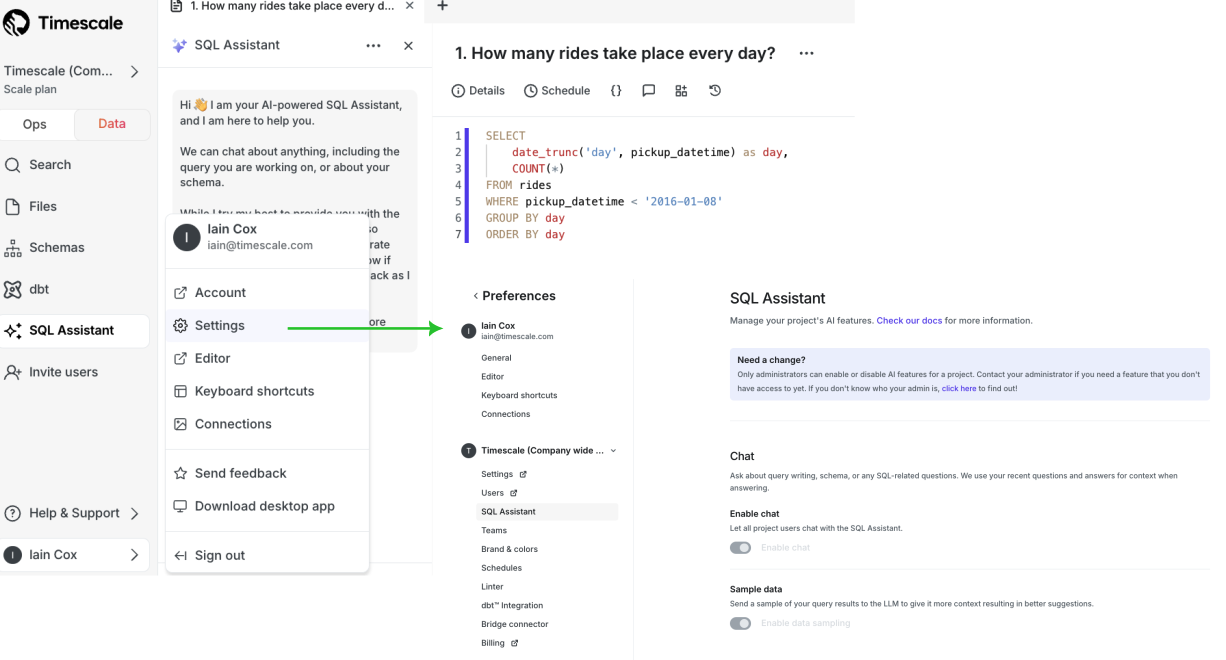
{SQL_ASSISTANT_SHORT} settings are:
* **Opt-in features**: all AI features are off by default. Only [members][project-members] of your {PROJECT_LONG}
can enable them.
* **Data protection**: your data remains private as {SQL_ASSISTANT_SHORT} operates with strict security protocols. To provide AI support, {CONSOLE_LONG} may share your currently open SQL document, some basic metadata about your database, and portions of your database schema. By default, {CONSOLE_LONG} **does not include** any data from query results, but you can opt in to include this context to improve the results.
* **Sample data**: to give the LLM more context so you have better SQL suggestions, enable sample data sharing in the {SQL_ASSISTANT_SHORT} preferences.
* **Telemetry**: to improve {SQL_ASSISTANT_SHORT}, {COMPANY} collects telemetry and usage data, including prompts, responses, and query metadata.
## {OPS_MODE_CAP} {SQL_EDITOR}
{SQL_EDITOR} is an integrated secure UI that you use to run queries and see the results
for a {SERVICE_LONG}.
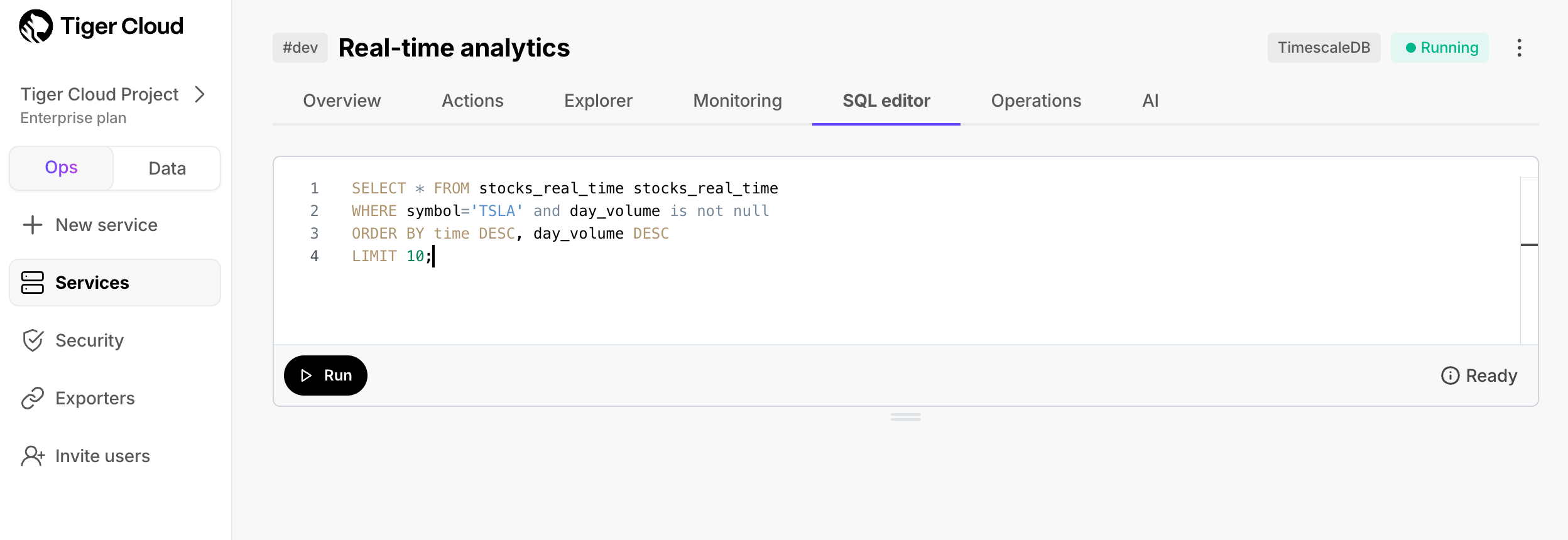
To enable or disable {SQL_EDITOR} in your {SERVICE_SHORT}, click `Operations` > `Service management`, then
update the setting for {SQL_EDITOR}.
To use {SQL_EDITOR}:
1. **Open {SQL_EDITOR} from {CONSOLE}**
In the [{OPS_MODE}][portal-ops-mode] in {CONSOLE}, select a {SERVICE_SHORT}, then click `SQL editor`.
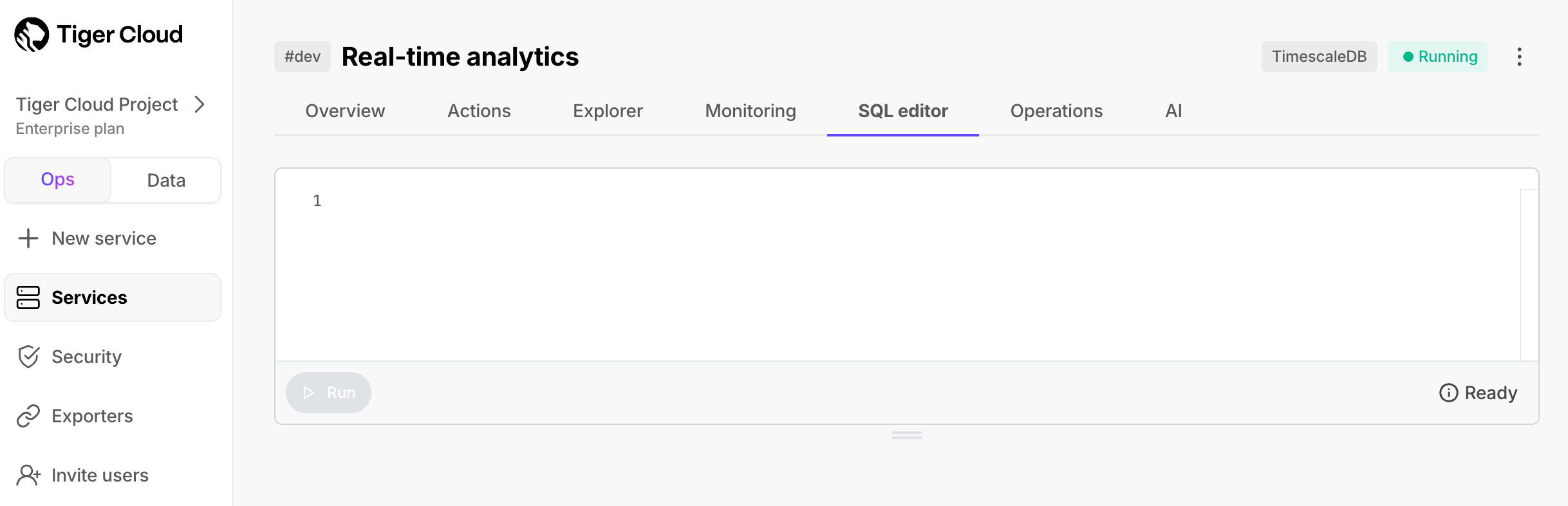
2. **Run a test query**
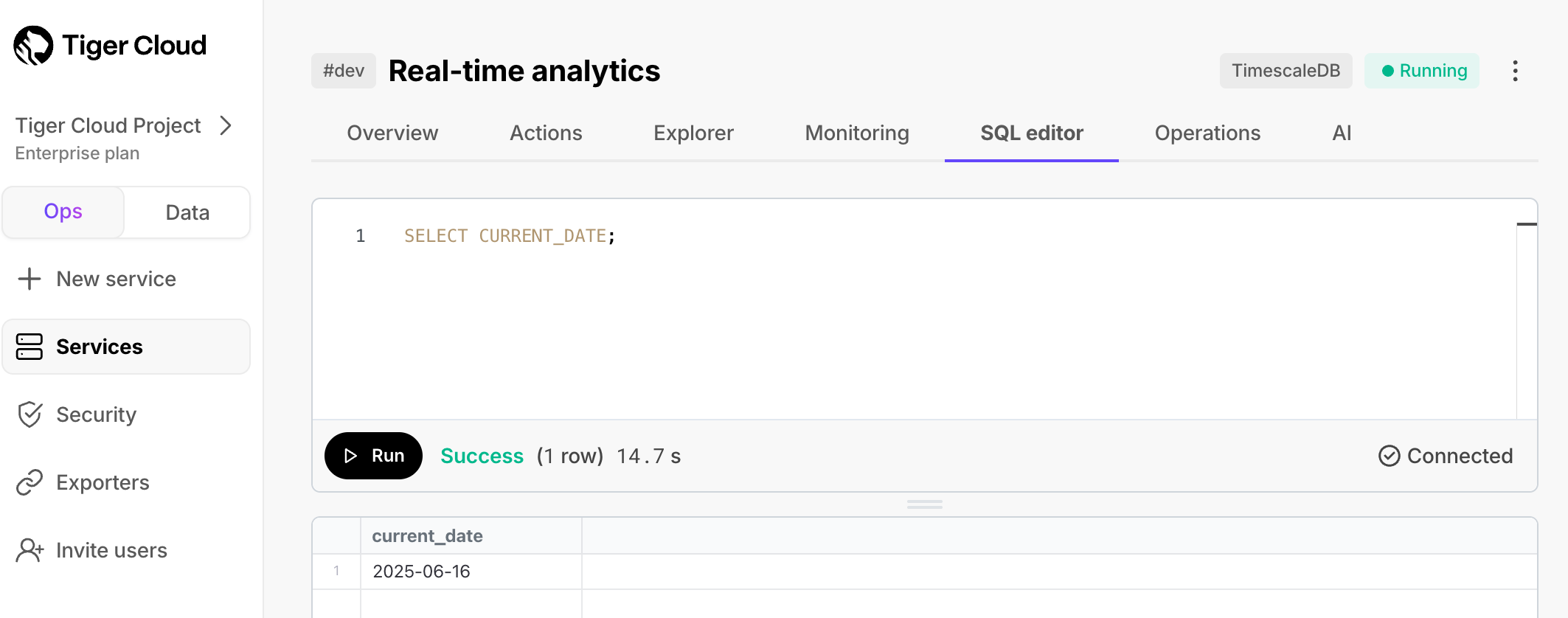
Type `SELECT CURRENT_DATE;` in the UI and click `Run`. The results appear in the lower window:
## Cloud {SQL_EDITOR} licenses
* **{SQL_EDITOR} in the {OPS_MODE}**: free for anyone with a [{ACCOUNT_LONG}][create-cloud-account].
* **Data mode**: the number of seats you are allocated depends on your [{PRICING_PLAN}][pricing-plan-features].
[{SQL_ASSISTANT_SHORT}][sql-assistant] is currently free for all users. In the future, limits or paid options may be
introduced as we work to build the best experience.
* **{POPSQL} standalone**: there is a free plan available to everyone, as well as paid plans. See [{POPSQL} Pricing][popsql-pricing] for full details.
What next? [Try the key features offered by {COMPANY}][try-timescale-features], see the [tutorials][tutorials],
interact with the data in your {SERVICE_LONG} using [your favorite programming language][connect-with-code], integrate
your {SERVICE_LONG} with a range of [third-party tools][integrations], plain old [Use {COMPANY} products][use-timescale], or dive
into the [API reference][use-the-api].
[tutorials]: /tutorials/
[integrations]: /integrations/
[connect-with-code]: /getting-started/start-coding-with-timescale/
[use-the-api]: /api/
[use-timescale]: /use-timescale/
[try-timescale-features]: /getting-started/try-key-features-timescale-products/
[bridge-connector]: https://docs.popsql.com/docs/bridge-connector
[charts]: https://docs.popsql.com/docs/creating-charts
[connection-info]: /integrations/find-connection-details/
[console]: https://console.cloud.timescale.com
[create-chart]: https://docs.popsql.com/docs/creating-charts
[create-cloud-account]: /getting-started/services/#create-a-timescale-cloud-account
[create-dashboard]: https://docs.popsql.com/docs/creating-dashboards
[create-schedule]: https://docs.popsql.com/docs/scheduled-queries
[install-psql]: /integrations/psql/
[integrations]: /integrations/
[popsql-connections]: https://popsql.com/connections
[popsql-desktop]: https://popsql.com/download
[popsql-pricing]: https://popsql.com/pricing
[portal-data-mode]: https://console.cloud.timescale.com/dashboard/services?popsql
[portal-ops-mode]: https://console.cloud.timescale.com/dashboard/services
[pricing-plan-features]: https://www.timescale.com/pricing#features
[project-members]: /use-timescale/members/
[query-variables]: https://docs.popsql.com/docs/query-variables
[read-replica]: /use-timescale/ha-replicas/read-scaling/
[run-popsql]: /getting-started/run-queries-from-console/#data-mode
[run-sqleditor]: /getting-started/run-queries-from-console/#ops-mode-sql-editor
[schedules]: https://docs.popsql.com/docs/scheduled-queries
[schema-browser]: https://docs.popsql.com/docs/schema
[services-portal]: https://console.cloud.timescale.com/dashboard/services
[share-query]: https://docs.popsql.com/docs/sharing-a-link-to-your-query-and-results
[sql-assistant]: /getting-started/run-queries-from-console/#sql-assistant
[sql-editor-settings]: https://console.cloud.timescale.com/dashboard/settings?popsql=%2Fpreferences%2Fai
[timescale-console]: https://console.cloud.timescale.com/
[version-history]: https://docs.popsql.com/docs/version-history
[write-query]: https://docs.popsql.com/docs/writing-a-query